LiDAR (Light Detection and Ranging) is a technology that measures distances using laser light. It is widely used in robotics, surveying, construction, infrastructure mapping, and 3D modelling to capture the shape and position of objects in the real world.
If you are interested in learning how to make a LiDAR scanner, you can start with a distance-measuring sensor, a microcontroller, and a suitable data-processing setup. By collecting distance measurements at different angles, you can create a basic 2D scan or develop a rotating system that captures three-dimensional information.
However, building a working scanner is different from producing reliable, survey-grade measurements. The quality of the sensor, mechanical stability, calibration, and data processing all affect the final result.
In this guide, we explain the essential components, the step-by-step building process, how to generate a 3D point cloud, and when professional 3D laser scanning services are a better choice.
What Is a 3D LiDAR Scanner?
A 3D LiDAR scanner is a device that measures distances to surrounding surfaces and uses those measurements to represent an environment in three dimensions.
Depending on the sensor design, it may use time-of-flight measurements, phase-based measurement, or other ranging techniques. The scanner combines distance information with angular or positional data to determine where each measured point lies in space.
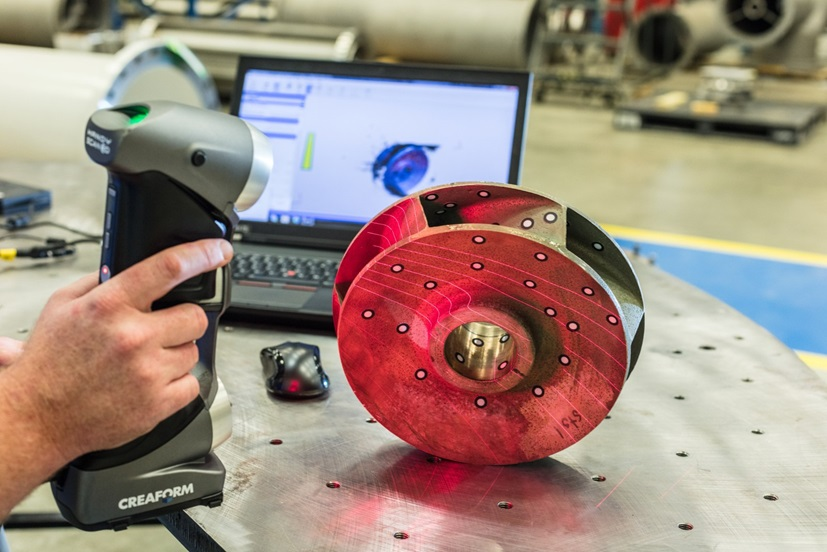
The result is called a point cloud: a collection of individual points representing the surfaces of buildings, machinery, roads, rooms, and other objects.
For example, a scanner positioned inside a factory can capture the locations of walls, columns, pipes, and equipment. Engineers can use the resulting data to understand existing site conditions before planning modifications.
How Does a LiDAR Scanner Work?
Most LiDAR scanning workflows follow four basic stages:
- Laser ranging: The sensor measures the distance to a target using its ranging technology.
- Angular measurement: The system records the direction associated with each measurement.
- Coordinate calculation: Distance and angle information are converted into spatial coordinates.
- Data processing: The collected measurements are organized into a point cloud for visualization and further analysis.
For a simple scanner, a distance measurement (r) and horizontal angle (\theta) can be converted into two-dimensional coordinates:
- (x = r\cos\theta)
- (y = r\sin\theta)
To create three-dimensional coordinates, the system also needs vertical angle information or another method of determining height. For a spherical coordinate convention, the equations can be expressed as:
- (x = r\cos\phi\cos\theta)
- (y = r\cos\phi\sin\theta)
- (z = r\sin\phi)
Here, (r) is the measured distance, (\theta) is the horizontal angle, and (\phi) is the vertical angle.
The coordinate convention depends on the scanner’s design. A rotating 2D LiDAR can produce a 3D scan when combined with controlled movement and suitable pose measurements, but the added motion must be accounted for accurately.
Tools and Components Required to Make a LiDAR Scanner
Before assembling the system, decide whether you want to build a simple educational prototype or experiment with three-dimensional mapping. A practical starting point is to use an existing LiDAR sensor rather than attempting to construct the laser-ranging electronics from individual components.
1. LiDAR or Time-of-Flight Sensor
The sensor is the main component. For a beginner project, choose a module with documented interfaces, a compatible driver, and a suitable measurement range.
A small time-of-flight sensor, such as the STMicroelectronics VL53L0X, is useful for learning basic distance measurement. Its range is limited, so it is not a replacement for a professional site-scanning instrument.
For a more advanced project, consider a 2D LiDAR unit that provides distance and angular measurements across a scanning plane.
2. Microcontroller or Single-Board Computer
An Arduino-compatible board can handle simple control tasks, while a Raspberry Pi or another single-board computer is suitable for running sensor drivers, recording measurements, and communicating with processing software.
Check that the selected hardware supports the sensor’s interface, data rate, and power requirements.
3. Rotating Platform and Motor
A rotating platform allows a fixed scanning plane to cover different directions. Depending on the design, you may need a stepper motor, motor driver, mounting bracket, and a way to determine the platform’s angular position.
The platform should be rigid and rotate consistently. Any wobble or uncertain angular position can introduce errors into the resulting point cloud.
4. Power Supply and Wiring
Use a regulated power supply that meets the requirements of the sensor, controller, and motor. Motors can introduce electrical noise or voltage fluctuations, so separate power regulation may be necessary.
5. Computer and Data-Processing Software
A computer is useful for recording, converting, and viewing scan data. Python can support custom processing, while tools such as Open3D provide functions for point cloud visualization and processing.
For robotic mapping, ROS-compatible sensor drivers and visualization tools can also be useful.
How to Make a LiDAR Scanner: Step-by-Step Process
The following process describes a practical prototype built around an existing LiDAR module. The exact wiring, software, and mechanical arrangement will depend on the hardware selected.
Step 1: Choose the Scanner Design
Start by deciding what you want to measure.
A short-range time-of-flight sensor is suitable for a basic distance-measurement experiment. A 2D LiDAR module is more appropriate when you want to capture a surrounding horizontal profile.
For a 3D prototype, you can mount a 2D scanner on a controlled tilt mechanism or use a sensor that already captures 3D data.
Define the intended measurement range, field of view, required point density, and expected accuracy before choosing components.
Step 2: Assemble the Hardware
Mount the sensor securely and connect it to the controller according to the manufacturer’s documentation.
For a rotating design, attach the sensor assembly to a stable platform and install the motor and position-control mechanism. Ensure that cables cannot become tangled during rotation.
Test the sensor and motor separately before combining them. Confirm that the controller receives valid distance measurements and that the motor moves predictably.
Step 3: Configure the Sensor Software
Install the manufacturer’s driver or a compatible software library. Configure the communication interface, sensor settings, and data-recording process.
For a ROS-based project, an appropriate LiDAR driver can publish scan measurements for visualization and processing. The MATLAB and Raspberry Pi example in the MathWorks documentation demonstrates a 2D LiDAR workflow.
Start by displaying the incoming measurements. Check for missing readings, invalid distances, communication errors, or unexpected sensor behaviour before attempting to generate a 3D model.
Step 4: Record Distance and Angle Data
For each measurement, record the distance and its corresponding angle. If the sensor rotates mechanically, also record the platform’s position.
Keep the measurements and timestamps synchronized. If the sensor moves while data is being collected, the system must account for that movement when calculating coordinates.
A basic 2D scanner can now plot points around the sensor. To create a 3D dataset, collect measurements at different vertical angles or combine scans with reliable position information.
Step 5: Convert Measurements into 3D Coordinates
Use the appropriate coordinate equations to transform the distance and angle readings into (x), (y), and (z) values.
Each valid measurement becomes a point in the scanner’s coordinate system. Remove invalid readings and check that the coordinate axes and units are consistent.
If the scanner is mounted on a moving platform, transform the points into a shared coordinate system using the platform’s measured position and orientation.
Step 6: Generate and Visualize the Point Cloud
Save the coordinate data in a suitable format, such as XYZ, PLY, or PCD, depending on the software workflow.
Load the dataset into a point cloud tool and inspect it from multiple angles. Check whether walls, edges, and other surfaces appear in their expected locations.
At this stage, you have a basic 3D representation of the scanned environment. A point cloud is not automatically a complete surface model; further processing may be needed to create a mesh or another usable engineering deliverable.
Software Used for LiDAR Data Processing
The software you choose depends on the scanner hardware and the intended output.
- Python: Useful for recording sensor readings, calculating coordinates, automating tasks, and developing custom processing scripts.
- ROS: Supports sensor drivers, robotics workflows, and the integration of LiDAR data with movement and mapping systems.
- Open3D: Provides tools for point cloud visualization, downsampling, outlier removal, and other processing operations.
- Specialized scanning software: Professional workflows may use dedicated software to register scans, clean data, check alignment, and prepare deliverables for CAD or BIM applications.
For example, Open3D supports voxel downsampling, which reduces the number of points while representing the data within a regular grid. This can make large datasets easier to handle, although excessive downsampling may remove important details.
Calibration and Common Challenges
Calibration is essential when you want the scanner to produce consistent measurements.
How to Calibrate a DIY LiDAR Scanner
Start by checking the sensor against reference distances measured with a suitable independent instrument. Repeat measurements at several distances within the sensor’s intended operating range.
For a rotating scanner, check the angular reference, platform alignment, and repeatability of the motor. For a 3D setup, also verify the relationship between the sensor coordinate system and the rotating platform.
Compare the results with your reference measurements and investigate systematic offsets or inconsistent readings. Follow the sensor manufacturer’s calibration guidance wherever available.
Common Problems to Watch For
Inaccurate distance readings: These can result from sensor limitations, unsuitable target surfaces, incorrect settings, or poor calibration.
Incomplete point clouds: Objects may be missed because of occlusion, limited field of view, or insufficient scan coverage.
Misaligned scans: Incorrect sensor positioning, platform movement, or poor registration can cause surfaces to appear doubled or displaced.
Excessive data noise: Invalid measurements and stray points can reduce the usefulness of the dataset. Filtering may help, but aggressive filtering can remove real features.
Mechanical instability: Vibration, loose mounts, and inconsistent rotation can affect spatial accuracy.
A successful prototype should be tested against known reference objects before its data is used for measurement or engineering decisions.
Applications of 3D LiDAR Scanning
LiDAR scanning is useful wherever existing physical conditions need to be captured digitally.
- Construction and architecture: Recording existing buildings for renovation, planning, and as-built documentation.
- Industrial facilities: Capturing equipment, pipework, structural elements, and plant layouts.
- Infrastructure and surveying: Collecting spatial information for roads, bridges, terrain, and other assets.
- Robotics: Supporting navigation, obstacle detection, and environmental mapping.
- BIM and digital engineering: Providing measured point cloud data for modelling and design coordination.
The suitability of a DIY system depends on its measurement capability, calibration, and the requirements of the project. A prototype used for learning should not be assumed to deliver survey-grade accuracy.
DIY LiDAR Scanner vs. Professional 3D Laser Scanning
A DIY scanner is useful for learning how ranging sensors, coordinate calculations, and point cloud processing work. It also provides flexibility for experimentation.
Professional 3D laser scanning is designed for projects that need dependable site coverage, controlled data acquisition, and deliverables that can be used in engineering workflows.
| Factor | DIY LiDAR Scanner | Professional 3D Laser Scanning |
|---|---|---|
| Main purpose | Learning and experimentation | Project documentation and engineering |
| Equipment | Selected modules and custom assembly | Purpose-built scanning equipment |
| Calibration | Depends on the builder and sensor | Defined procedures appropriate to the equipment and project |
| Data processing | Often requires custom development | Established processing and quality-control workflows |
| Deliverables | Experimental point clouds or models | Project-specific point clouds, drawings, or BIM models |
| Best suited for | Prototypes and learning projects | Construction, industrial, infrastructure, and renovation work |
Professional scanning does not automatically guarantee a particular accuracy. Results depend on the equipment, site conditions, capture method, processing, and agreed project tolerances.
How Fibrox 3D Supports Professional LiDAR Scanning Projects
Building a scanner can help you understand the technology, but business projects often require more than collecting distance measurements. They may need complete site coverage, registered point clouds, accurate existing-condition documentation, or models that can be used directly by design and engineering teams.
Fibrox 3D provides professional 3D scanning and digital engineering solutions for buildings, industrial facilities, infrastructure, and other complex environments.
Its services include:
- 3D laser scanning: Capturing existing site conditions to support measurement, documentation, and planning.
- LiDAR data processing: Processing and organizing scan datasets into usable spatial information.
- Point cloud processing: Preparing scan data for visualization, CAD documentation, and downstream modelling.
- Scan to BIM services: Converting point cloud data into structured Building Information Models for as-built documentation, renovation, and coordination.
For example, a contractor planning modifications to an existing industrial facility may need to understand the locations of structural elements, pipes, and equipment before design work begins. A professionally captured and processed point cloud can provide the spatial reference needed for that workflow.
Explore Fibrox 3D‘s 3D laser scanning and reality capture solutions, LiDAR data processing services, and Scan to BIM services to learn more about the available options.
If your project requires reliable site data rather than an experimental prototype, contact Fibrox 3D to discuss your scanning requirements and expected deliverables.
Conclusion
Learning how to make a LiDAR scanner is a useful way to explore distance measurement, sensor integration, coordinate calculations, and 3D point cloud generation. Starting with an existing sensor and a simple scanning setup makes it easier to test the complete workflow before moving to more advanced designs.
However, producing dependable data for construction, infrastructure, and industrial engineering requires careful attention to calibration, coverage, registration, and processing.
For projects that need reliable existing-condition data, CAD documentation, or BIM-ready outputs, Fibrox 3D can help turn captured site information into practical digital deliverables.
Frequently Asked Questions
1. Can you build a LiDAR scanner at home?
Yes. You can build a basic prototype using an existing ranging sensor, a controller, and suitable software. Its capabilities depend on the sensor and design.
2. What components are required to make a 3D LiDAR scanner?
Typical components include a LiDAR sensor, controller, mounting hardware, power supply, and computer. A rotating design may also require a motor and position feedback.
3. Can Arduino be used to build a LiDAR scanner?
Arduino can control compatible sensors and motors. More demanding data processing or 3D mapping may require a computer or single-board computer.
4. How does a LiDAR scanner generate a point cloud?
It converts distance measurements and directional or positional information into three-dimensional coordinates, then combines those coordinates into a point cloud.
5. What software is used to process LiDAR point clouds?
Depending on the workflow, Python, ROS, Open3D, and specialized scanning applications can be used to visualize, filter, register, and process point cloud data.
6. Is a DIY LiDAR scanner suitable for professional surveying?
Not automatically. Professional surveying requires suitable equipment, calibration, controlled procedures, and verified accuracy appropriate to the project’s requirements.
7. What is the difference between LiDAR scanning and Scan to BIM?
LiDAR scanning captures spatial measurements, while Scan to BIM converts registered point cloud data into structured BIM models representing existing building conditions.
8. Can Fibrox 3D process existing LiDAR point cloud data?
Yes. Fibrox 3D offers LiDAR data processing and Scan to BIM services for suitable client-provided scan datasets and project requirements.