When an existing building needs to be renovated, retrofitted, expanded, or documented, the first challenge is understanding its actual condition. Existing drawings may be incomplete, outdated, or different from what is physically present on site.
Scan to BIM addresses this challenge by combining 3D reality capture with Building Information Modeling (BIM). A 3D laser scanner captures the existing building as a dense point cloud, which is then processed and used as a reference for creating an intelligent BIM model.
Instead of relying only on old drawings or manual measurements, project teams can work from a digital representation based on measured site conditions. This makes Scan to BIM particularly useful for renovation, retrofit, restoration, coordination, and facility management projects.
What Is Scan to BIM?
Scan to BIM is the process of capturing an existing building or structure using 3D scanning technology and converting the resulting point cloud data into a BIM model.
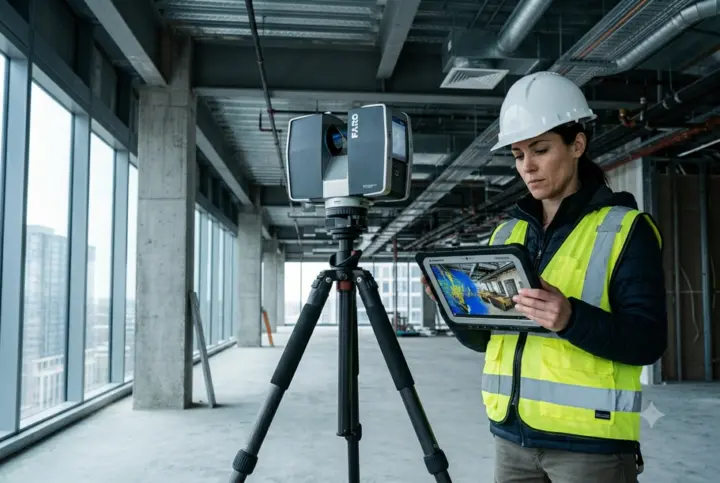
The process generally begins with terrestrial laser scanning, mobile LiDAR, or another suitable reality-capture method. The scanner records the geometry of the environment as millions of measured points. These points form a point cloud, which represents the physical conditions captured during the survey.
The point cloud is then registered, cleaned, and prepared for BIM modeling. BIM professionals use the processed point cloud as a reference to model elements such as walls, floors, ceilings, doors, windows, structural components, ducts, pipes, and other building systems.
The important distinction is that a point cloud mainly represents measured geometry, while a BIM model organizes that geometry into identifiable building elements that can carry additional information and support design and coordination workflows.
For projects where accurate existing-condition information matters, Fibrox 3D uses Scan to BIM workflows to transform point cloud data into structured BIM models for renovation, retrofit, as-built documentation, and related applications.
How Does the Scan to BIM Process Work?
A typical Scan to BIM process involves several connected stages. The exact workflow can vary depending on the building, required accuracy, project scope, and required Level of Development (LOD).
1. Project Planning and Scan Preparation
The process starts by defining what needs to be captured and what the final BIM model will be used for.
Project requirements may include:
- Areas and building elements to be documented
- Required accuracy and tolerances
- Required LOD
- Architectural, structural, or MEP requirements
- Coordinate system and project reference
- Required BIM software and deliverable formats
Good planning helps ensure that the field survey captures sufficient coverage for the intended BIM model.
2. 3D Laser Scanning and Data Capture
The existing building or site is captured using appropriate 3D reality-capture equipment.
Terrestrial laser scanners can capture detailed building interiors, exteriors, structures, and MEP environments. Depending on project requirements, mobile scanning, LiDAR, photogrammetry, or other complementary technologies may also be used.
The result is a collection of scan data representing the existing physical environment.
3. Point Cloud Registration and Processing
Individual scans need to be aligned into a common coordinate system. This process is known as point cloud registration.
After registration, the data can be cleaned and organized to remove unwanted points, noise, or unnecessary information. The processed dataset provides a reliable reference for BIM modeling.
Common point cloud formats used in BIM workflows include formats such as E57, RCP, RCS, LAS, and XYZ, depending on the scanning and processing software.
4. BIM Project Setup
Before modeling begins, the BIM environment is configured according to the project requirements.
This may include:
- Project coordinates
- Levels and grids
- Units
- Modeling standards
- Project templates
- Naming conventions
- Required LOD
- Architectural, structural, and MEP requirements
The processed point cloud can then be brought into the BIM environment as a reference for modeling.
5. BIM Modeling From Point Cloud
This is the stage where measured scan data becomes an actual BIM model.
Modelers interpret the point cloud and create appropriate BIM elements based on the visible and measurable existing conditions.
Depending on the project scope, this may include:
Architectural elements: walls, floors, ceilings, doors, windows, roofs, and façade elements.
Structural elements: columns, beams, slabs, foundations, and structural framing.
MEP elements: ducts, pipes, equipment, cable trays, and other visible building services.
The required level of detail depends on the purpose of the model. A model intended for basic documentation may require less detail than one being used for detailed design coordination or facility management.
What Is Point Cloud to BIM?
Point cloud to BIM is closely related to Scan to BIM, but the terms describe slightly different parts of the workflow.
Scan to BIM generally refers to the broader process that starts with capturing the existing environment and ends with a BIM model.
Point cloud to BIM specifically describes the modeling stage in which processed point cloud data is converted into BIM elements.
In simple terms:
Existing Building → 3D Scanning → Point Cloud → Processing → BIM Modeling → Validated BIM Model
This distinction is useful because point cloud processing and BIM modeling are separate technical stages, even though they are often discussed together.
Benefits of Scan to BIM
- Accurate Existing-Condition Documentation
- Reduced Manual Measurements
- Faster Data Capture and Modeling
- Better Renovation and Retrofit Planning
- Improved Design Coordination
- Early Clash Detection
- Reliable As-Built Documentation
- Better MEP Coordination
- Improved Project Decision-Making
- Support for Facility Management
Applications of Scan to BIM
The applications of Scan to BIM extend across different stages of the building lifecycle.
Renovation and Refurbishment: Existing buildings often have conditions that differ from their original drawings. Scan to BIM provides a measured basis for developing renovation designs.
Retrofitting: For structural, architectural, or MEP upgrades, accurate information about the existing environment helps teams plan modifications around existing elements.
Heritage and Historic Buildings: Scan to BIM can support the digital documentation of heritage structures. Detailed reality-capture data provides a reference for restoration, conservation, and future documentation.
As-Built Documentation: When reliable as-built information is required, scan data can be used to develop BIM models representing the surveyed condition of the building.
MEP Coordination: Existing pipes, ducts, equipment, and other building services can be modeled from scan data to support coordination and upgrade projects.
Facility Management: A structured BIM model can provide a digital reference for building components, spaces, and systems throughout the operational stage of a facility.
What Is LOD in Scan to BIM?
LOD, or Level of Development, defines the level of detail and reliability expected from elements within a BIM model.
The required LOD should be established before modeling begins because it affects the modeling scope, time, and final deliverables.
For example, an existing-building model created for general spatial documentation may require a different level of development than a model intended for detailed coordination or fabrication-related workflows.
Fibrox 3D develops BIM models according to project requirements and specified LOD, rather than assuming that every Scan to BIM project requires the same level of detail.
Why Choose Fibrox 3D for Scan to BIM?
Fibrox 3D combines 3D scanning and BIM modeling workflows to transform physical environments into usable digital information.
Our Scan to BIM workflow can include:
- 3D laser scanning and reality capture
- Point cloud registration and processing
- Architectural BIM modeling
- Structural BIM modeling
- MEP BIM modeling
- As-built BIM documentation
- Model coordination and validation
- LOD-based BIM development
By connecting scanning with BIM modeling, Fibrox 3D can help project teams move from captured site conditions to structured digital models for renovation, retrofit, coordination, documentation, and facility-related workflows.
Conclusion
Scan to BIM is more than simply converting a point cloud into a 3D model. It is a workflow that connects 3D reality capture, point cloud processing, BIM modeling, and model validation to create a structured digital representation of an existing building.
For renovation, retrofit, heritage documentation, MEP coordination, as-built documentation, and facility management, the value of Scan to BIM comes from starting with measured existing conditions rather than assumptions.
With the right scanning method, point cloud processing, modeling standards, LOD, and quality checks, Scan to BIM provides a practical foundation for better-informed design and building management decisions.
FAQs
1. What is Scan to BIM?
Scan to BIM is the process of capturing an existing building using 3D scanning technology and converting the resulting point cloud into a structured BIM model.
2. What is the difference between Scan to BIM and point cloud to BIM?
Scan to BIM describes the broader workflow from scanning through BIM delivery, while point cloud to BIM refers specifically to converting processed point cloud data into BIM elements.
3. What technologies are used for Scan to BIM?
Terrestrial laser scanning is commonly used, while mobile LiDAR, photogrammetry, and other reality-capture technologies may be used depending on project requirements.
4. What is Scan to BIM used for?
Scan to BIM is commonly used for renovation, retrofit, as-built documentation, heritage projects, MEP coordination, design development, and facility management.
5. Can Scan to BIM create an accurate as-built model?
Yes. When the scan is properly planned, captured, processed, and validated, the resulting BIM model can represent the surveyed existing conditions according to the project’s required accuracy and LOD.
Also Read: White Light 3D Scanner: How It Works, Applications & Benefits